Best Free TikTok LIVE Comment Reader (TTS) in 2026: Tikmo Studio vs. TikFinity & TikOps Compared
Why pay monthly just to have your TikTok LIVE chat read aloud? Compare Tikmo Studio’s 100% free unlimited browser TTS, smart slang normalizer, and interactive games against legacy tools.
When you are demonstrating products, gaming, or hosting an energetic TikTok LIVE session, squinting at a fast-moving mobile chat screen breaks your eye contact with the camera. A TikTok LIVE Comment Reader (Text-to-Speech / TTS) turns every viewer question into instant, natural voice audio in under a second.
Yet many creators hit an annoying paywall with legacy tools: either the free tier locks TTS behind a strict daily quota (often 100 reads per day—barely 15 minutes of a busy stream), requires downloading clunky Windows .exe installers, or reads out spam and chat commands verbatim.
2026 Comparison: Tikmo Studio vs. Other TikTok LIVE TTS & Overlay Tools
Before committing your stream setup to a tool that cuts off mid-broadcast, compare how Tikmo Studio stacks up against traditional desktop and web tools:
| Feature / Criteria | Tikmo Studio (Web & OBS) | TikFinity / TikOps | Daily-Capped Web TTS Bots | Legacy Desktop .exe Tools |
|---|---|---|---|---|
| Free Daily TTS Quota | 100% Free Unlimited Reads via Browser Audio (FREE) + optional Neural AI voices | Key TTS voices & advanced routing often gated behind monthly subscriptions | Capped at ~100 free reads/day or daily credit deductions | Short trial periods, per-PC license locks |
| Smart Text & Price Normalization | Auto-expands prices (`299k`), abbreviations & social slang into natural speech | Reads raw abbreviations letter-by-letter unless manually scripted | Basic raw text reading | Relies on outdated OS system voices |
| Connection Security | Connect in 10s using only your public @username — no password or stream key | Web/desktop login with multi-tab configuration | Browser extension or session cookie required | Requires local .exe installation |
| Second-Phone Speaker Mode | Yes — open on any phone/tablet and tap Browser Speaker: ON | Desktop-first layout, cramped on mobile browsers | Partial mobile web support | Windows-only |
| Anti-Spam & Queue Freshness | Max queue age (`15s`), 200 char cap, repeated-char filter, ignores ! and / commands | Basic keyword blacklist | Basic word filter on paid tiers | Manual queue clearing when chat spikes |
| Built-In Gift Conversion Games | Includes Gift Jar + 3D Alerts + 3 Live Interactive Games (Fantasy Chibi War, Gear Arena, Wizard Spin) | Basic overlays & simple wheel widgets | Chat reader and simple alerts only | Text-to-speech only |
Why Streamers Switch to Tikmo Studio: Instead of rationing your chat interaction, Tikmo Studio gives you unlimited free Browser Audio TTS right out of the box—so you can stream 6 hours a day without hitting a mid-stream quota wall.
4 Unfair Advantages of Tikmo Studio’s Free TikTok LIVE Comment Reader
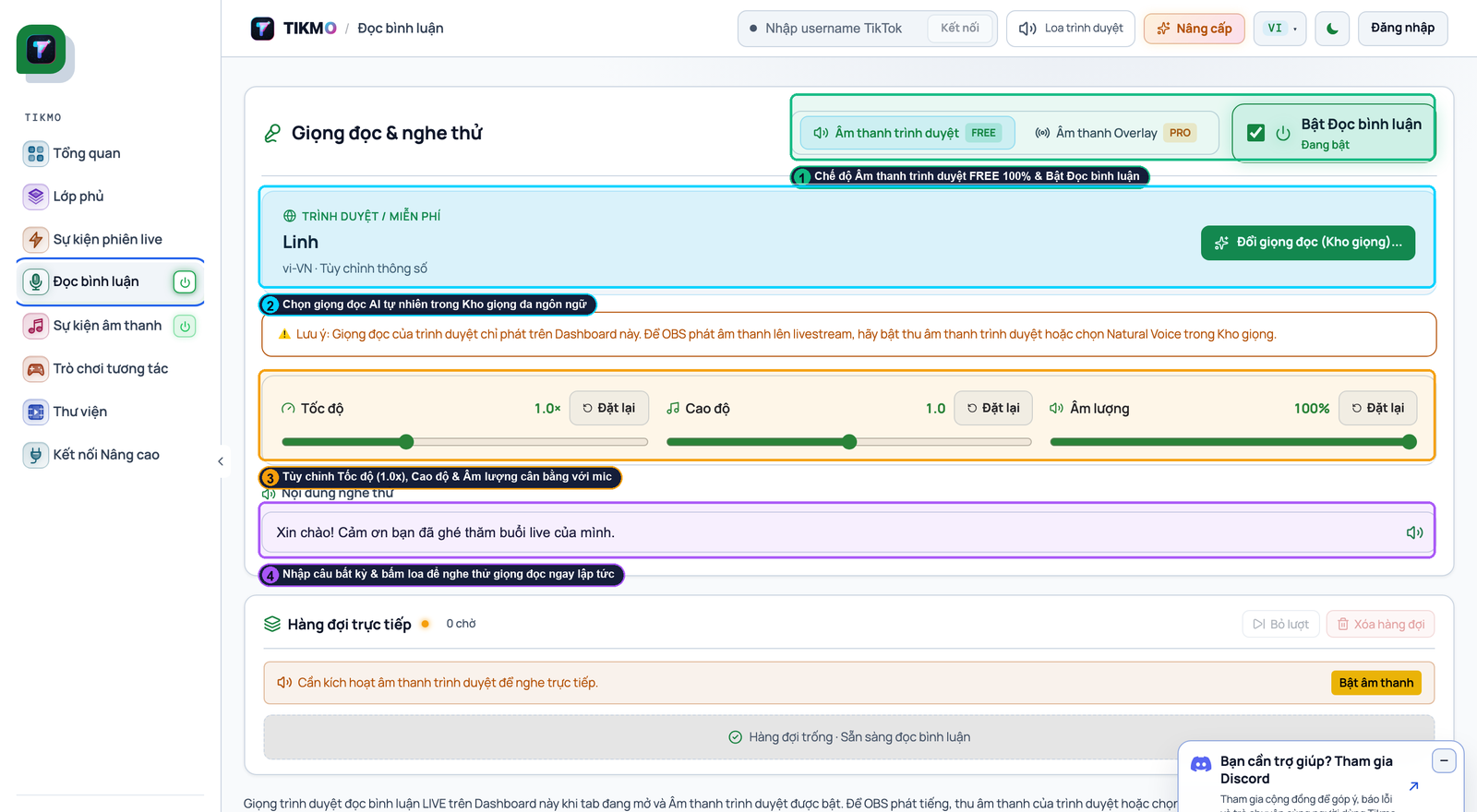
1. Unlimited Free Browser Audio + Instant Queue Control (Callouts ①, ②, ③)
In the Comment Reader tab (shown in the annotated screenshot above):
- Callout ①: Toggle the reader ON and select Browser Audio (`FREE`) for zero-cost unlimited voice synthesis, or switch to Tikmo AI whenever you want studio-grade neural voices.
- Callout ②: Pick your preferred voice and set playback speed between 1.05x and 1.15x so chat reads sound brisk and conversational.
- Callout ③: Monitor the live Playback Queue in real time, with one-click controls to pause or skip any message.
2. Smart Normalization & Anti-Spam Queue Protection
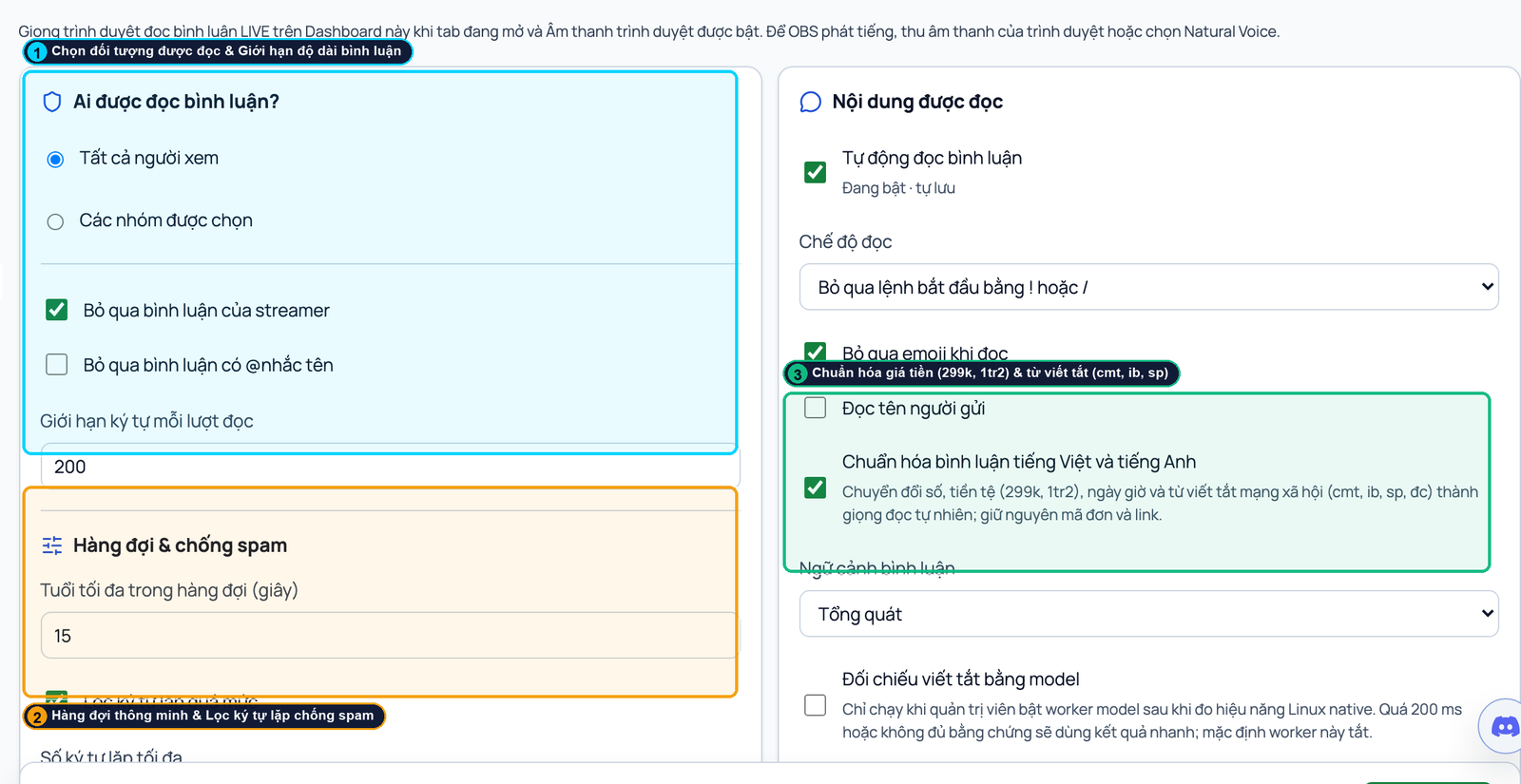
Nothing ruins a stream faster than a troll pasting 500 repeated characters or a TTS queue lagging 3 minutes behind live chat. Tikmo prevents both automatically:
- Callout ① (Audience & Length Cap): Choose whether to read All Viewers, Followers, or Gifters, and cap each spoken message at 200 characters.
- Callout ② (15-Second Queue Freshness & Spam Filter): Set Max Queue Age = `15s` so stale messages are dropped during chat spikes, strip excessive repeated characters, and automatically skip bot commands starting with ! or /.
- Callout ③ (Automatic Slang & Currency Normalization): Converts shorthand numbers, prices, and chat abbreviations into natural spoken phrases while leaving product codes intact.
3. Works on Both PC (OBS / TikTok LIVE Studio) and a Second Phone
Streaming from your phone without a PC? Open Tikmo Studio on a second phone or iPad, type your TikTok @username, and tap Browser Speaker: ON in the top bar. See our step-by-step PC & mobile AI voice setup guide.
4. The Retention Flywheel: Turn Chatters into Gifters with Widgets & Interactive Games
Free TTS gets viewers talking, but combining it with visual goals and interactive games turns those chatters into active gifters:
- Add a live Gift Jar / Gift Goal widget and Gift Sound Alerts.
- Launch Fantasy Chibi War, Gear Arena 9:16, or Wizard Spin so viewers send gifts to evolve their on-screen avatars and win live spins. Follow our Complete A–Z Tikmo Studio Setup Guide to connect everything in 5 minutes.