Multilingual AI TTS Reader
Instantly announce viewer names and comments using natural multilingual AI voices.
MN
minhngoc: Is the second style available in a size M?
Read LIVE comments aloud, respond to gifts with sound and visual alerts, design browser overlays, and connect event rules to OBS Studio.
Instantly announce viewer names and comments using natural multilingual AI voices.
Fireworks, gift combo multipliers, custom sounds, and screen shakes when fans send gifts.
Lucky Wheel và giveaway dành cho khán giả.
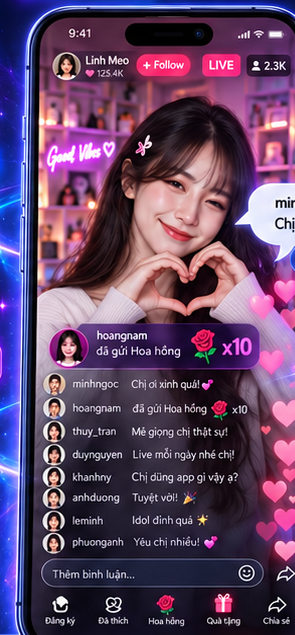
@thuy_tran: Love your voice! 💕
Switch scenes, toggle filters, and zoom your camera automatically.
Top Gifters, custom coin goals, and live leaderboards rendered seamlessly on Canvas.
Play sounds in your browser without installing a separate app.
See how Tikmo responds when viewers send gifts or comments during a LIVE stream.
Enable JavaScript to preview voice reader and alerts.
AI TTS: "Thanks for the roses, @minhngoc!"
No coding or complicated setup required. Tikmo runs in your browser.
Enter your TikTok username (for example, @streamer_pro). Tikmo connects through a public event stream and never asks for your password.
Choose what happens when a viewer sends a Rose 🌹: play a sound, thank the viewer by name, or switch your OBS camera angle.
Copy your overlay link from Tikmo and add it as a Browser Source in OBS Studio or TikTok LIVE Studio. Start streaming when you are ready.
Transparent monthly pricing in USD. Custom annual discounts available.
Get started with the essential tools for your livestreams.
Unlock more automation, integrations, and resources for professional creators.
| Feature | Free | Pro |
|---|---|---|
| TikTok Accounts | 1 accounts | 5 accounts |
| Concurrent LIVE Sessions | 1 sessions | 1 sessions |
| Workspace Members | 1 members | 5 members |
| Layouts per Profile | 1 layouts | 25 layouts |
| Canvas Layers | 5 layers | 60 layers |
| Active Rules per Profile | 5 rules | 100 rules |
| Media Storage | 20 MB | 100 MB |
| Browser voice with short ads | Yes | Yes |
| Natural cloud voice library with no ads | No | Yes |
| Standard Widgets | All 52 overlay effects unlocked | All 52 overlay effects unlocked |
| Audio on Overlay | Yes | Yes |
| Advanced Automation Rules | No | Yes |
| Premium Widgets | All 52 effects currently unlocked for free | All 52 effects currently unlocked for free |
| OBS Scene Switching | Yes | Yes |
| Webhook Integration | No | Yes |
| Interactive LIVE Minigames | Interactive games require Pro | Interactive game library for LIVE |
| Event History | 7 days | 90 days |
Designed for streamers, LIVE idols, and live shopping creators.
Focused guides for gifts, spoken chat, goals, games, and OBS.
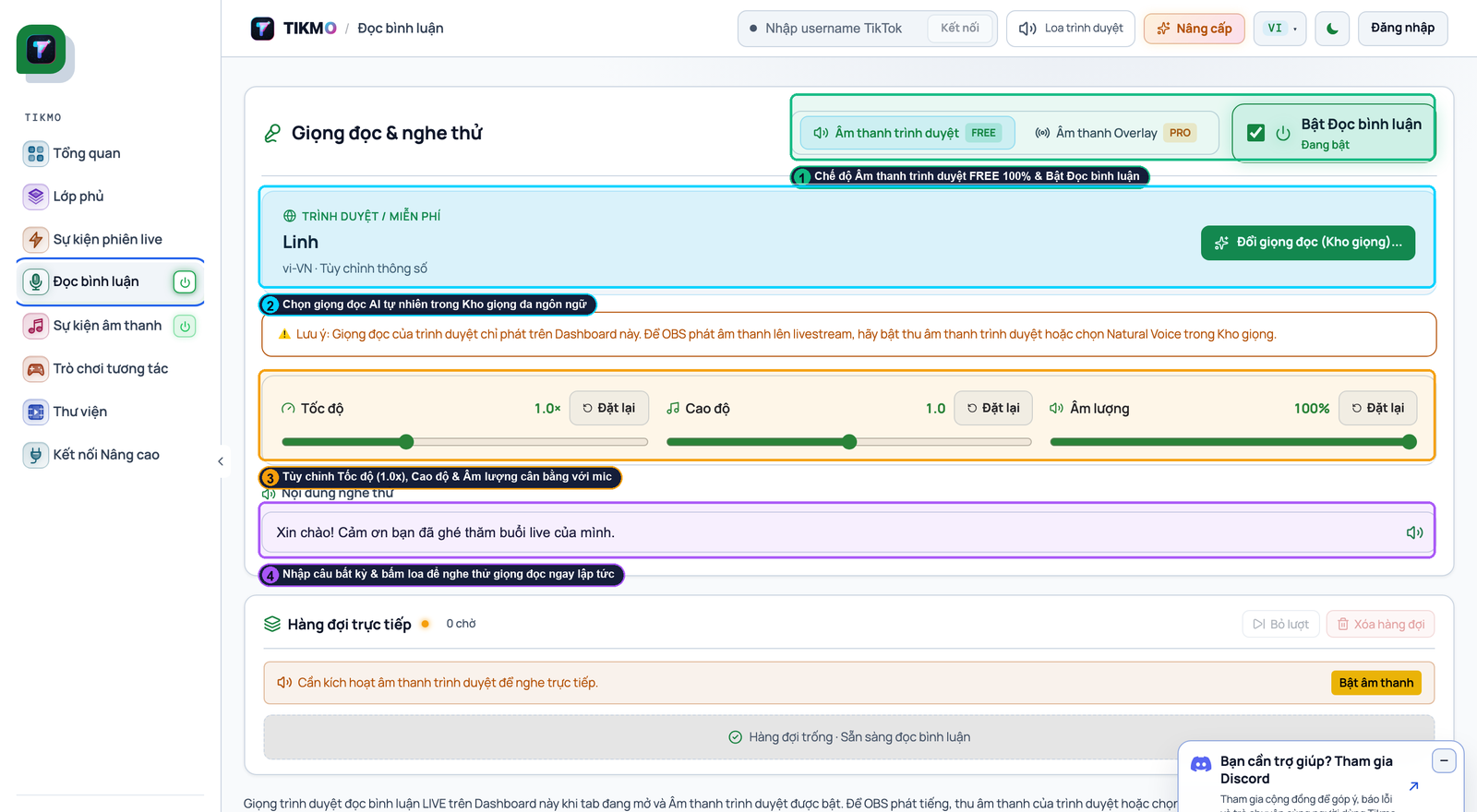
Why pay monthly just to have your TikTok LIVE chat read aloud? Compare Tikmo Studio’s 100% free unlimited browser TTS, smart slang normalizer, and interactive games against legacy tools.
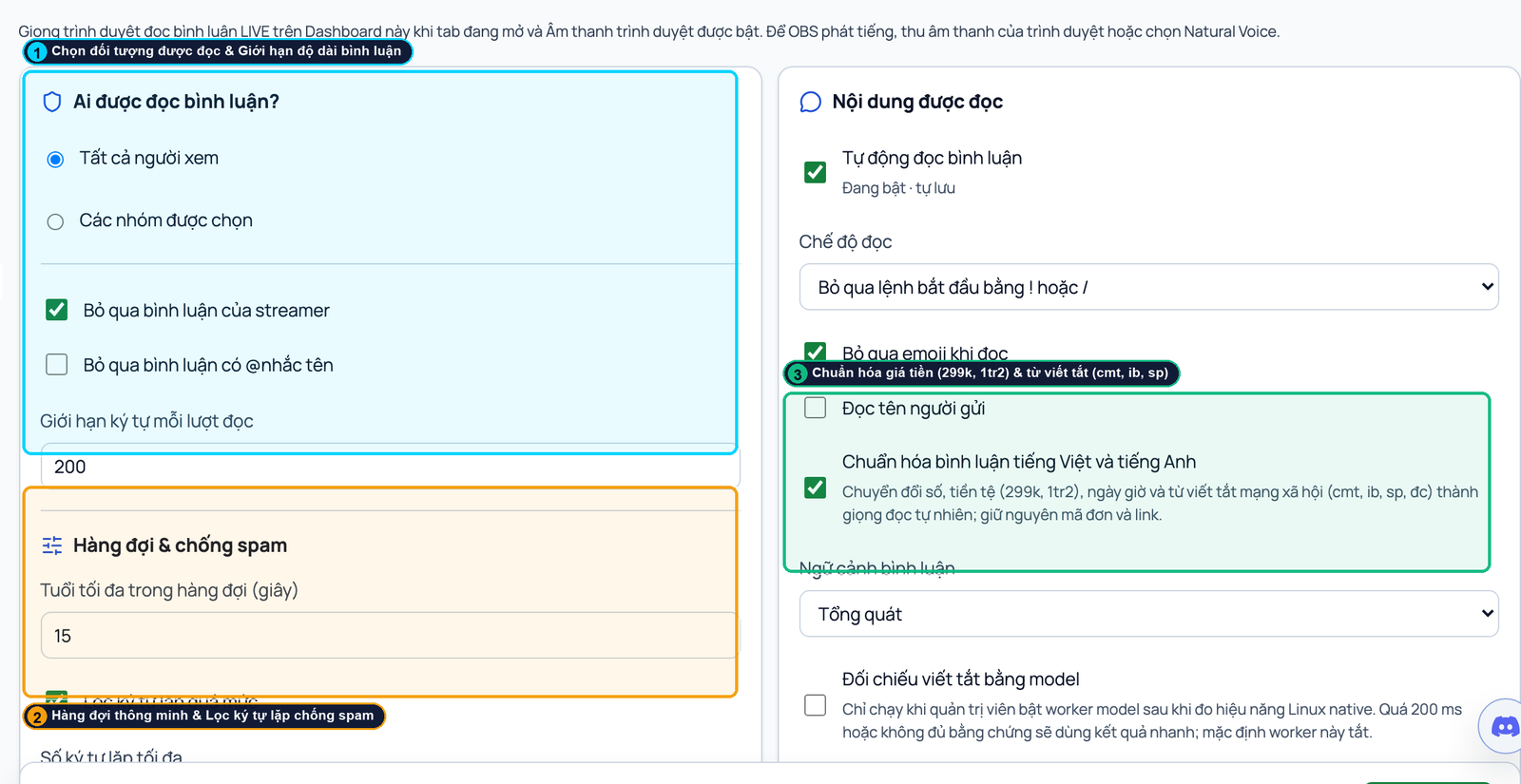
Step-by-step visual guide to enabling 100% free unlimited TikTok LIVE comment reading on a second phone or inside OBS Studio in under 60 seconds.
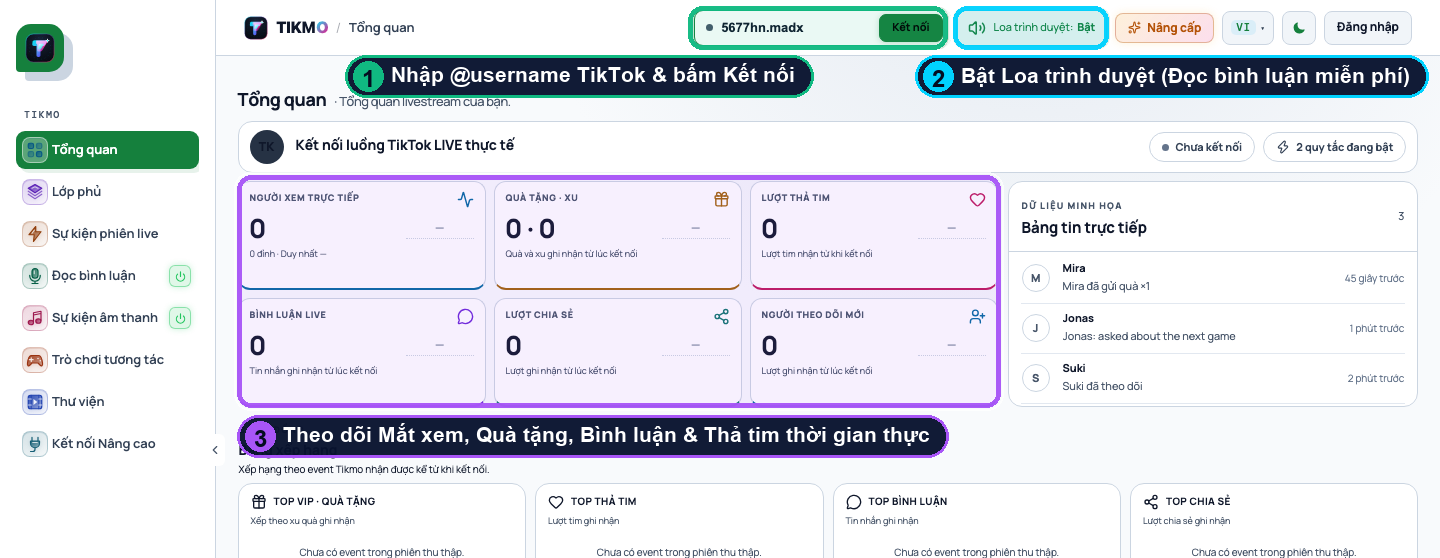
The ultimate annotated walkthrough: connect your TikTok LIVE username in 10 seconds, add a 9:16 Gift Jar, set up MP3 gift sound alerts, enable free unlimited TTS, and launch interactive games.
Yes! The Free plan gives you access to essential interactive tools and overlays. You can upgrade anytime to unlock advanced sound alerts and high-concurrency capabilities.
Simply create a Tikmo account, enter your TikTok ID, and start your live session. Paste the generated overlay URL into OBS Studio Browser Source, and you are ready to shine.
Yes. In addition to fast device-native voices, Tikmo supports premium cloud voices (OpenAI, ElevenLabs, Google Cloud) via Bring-Your-Own-Key (BYOK) on eligible plans.
We accept global PayPal payments and instant banking QR transfers where supported. Your subscription unlocks immediately upon payment confirmation.
No. All your designed layouts and assets are safely preserved. Feature capabilities adjust according to your active subscription limits.
Make your stream your own with comment reading, gift effects, and scene automation. Get started for free.